Showing posts with label Tools. Show all posts

Tuesday, 16 August 2011

Construction Laser Levels, Do You Have the Right Tools For the Trade?


With a large variety of construction laser levels units available, deciding which model to purchase is such a daunting task. Researching for specific features of products can be so time consuming that people would seldom have enough time to deal with. Here is a basic guide that would cater to the basics of construction laser levels.

construction laser levels is used to determine the accurate level of reference when doing jobs where layout is necessary. Most of these jobs deal with heights such as installing chair railings, ceiling tiles and receptacles for power for home or building construction or even when installing sewer pipes or making a site grading plan for a new building. This may also be used for smaller tasks like hanging pictures or decorations on the wall.

First, determine what kind of work do you intend to do? Is it outdoors, indoors or both?

Indoor applications of laser levels include aligning of walls, shelves and cabinets, leveling floors, checking door heights, installing drop ceilings, chair rails and checking door or window heights.

If it is for the outdoors, you can always perform any type of basic survey using construction laser levels as well as easily check and level posts on fences, decks and porches. Laser levels can also be used for site layout, masonry alignment and in checking land elevations. Some lasers are capable of grading proper irrigation and drainage and in contour farming.

It is important to take note that selecting a construction laser should not be limited to application. Depending on the layout distance of a construction, you can choose from three different types of lasers that are less time consuming. The Plumb or Dot Lasers work like a laser plumb bob or a reference point on the wall or work surface. The Line Level Lasers or Laser Line Generators, however, produces a level line in one direction and is commonly used indoors because it is small and hand-held. Rotary level lasers emit level line around the workspace of about 360 degrees. This is usually larger and used with surveying tripods. Rotary lasers can be used outdoors with the help of a laser detector or commonly known as laser receiver. This allows the human eye to see the laser even in daylight even at significant distances.

There are several types of units of construction laser levels which include manual-leveling, horizontal lasers, self-leveling and automatic; and dual-beam lasers.

With manual-leveling lasers, operators manually adjust the unit by turning the thumb screws and leveling the equipment by looking at the bubble vials. For self-leveling and automatic-leveling lasers, the unit maintains its level within a specific range. The operator would tune the laser to somewhat close to being level and then the laser will do the fine leveling. However, some units may shut themselves down when they get out of level even by 3 or 5 percent.


Visit laser level construction at http://laserlevelconstruction.com/ for more information.


This post was made using the Auto Blogging Software from WebMagnates.org This line will not appear when posts are made after activating the software to full version.

Wednesday, 27 July 2011

SEO Tools to Increase Your SEO Optimization Efforts


Are you completely clueless when it comes to SEO Optimization?

No matter if you are an experienced webmaster or a complete novice, you have probably noticed the great struggle that comes with increasing your search engine ranking position or SERPS, if your cool. The problem is that there are SO many different SEO Optimization strategies being outlined all over the web that it is hard to know which ones to choose. I am here to solve this problem for you. I am going to walk you through the proven step by step process of vastly improving your SERPS.

Step 1: Figure out what keywords you want to optimize for.

It is important to figure out which keywords to optimize for before you begin your SEO optimization efforts. You will want to pick out two or three keyword phrases that you want your website to rank high for. You can find great keywords by using Google AdWords: Keyword Tool. Just search Google for google keyword tool and enter in the keywords that you are thinking about optimizing for and this program will show you the previous months search volume for those specific keywords. This SEO tool will even provide you with alternative synonymous keywords that you can choose from. I recommend choosing a keyword phrase that has had at least 10,000 searches in the last month. I know you may be thinking why not optimize for the keyword that has the most searches during the month? Well, the problem with this strategy is that the more searches that keyword phrase gets, the more competitors there are who will be optimizing for them. The more competitors, the harder it will be to rank for those specific keywords. This is why I suggest choosing to optimize for a less competitive keyword phrase at first. Once you have succeeded with this less competitive keyword phrase, your traffic will increase, thus increasing your Google merit, and in turn making it easier for you to rank well for more competitive keywords later.

Step 2: Analyze Your Competitors On-page Optimization.


You will want to go to Google and do a search for your keyword terms. Make sure you are not logged into Google when you do this search, as it may change the results. On the search results page you will want to analyze your main competitors sites (i.e. the top 5 results). The following is a step by step guide of how to perform this analysis:
Check the page rank of the webpage that you are trying to outrank. You can find several different page rank checker tools by going to Google and searching for page rank checker. If the page rank of the top 5 websites is below a page rank 5, you may have a good chance of out optimizing them. If the page rank is 6 or above you might want to try optimizing for a different set of keywords, as a page rank of 6 and up is VERY good and will be hard to beat.
Go to the website that is ranking high for your keywords, start from site 1 and work your way down through site 5. Once on the page, click the view button at the top of your browser and then click Page Source. When this new screen pops up click the edit button and then click find.
Search for the page's title tags. Once you find them, see if the keywords you are analyzing are included in the competitor's title. If they are, that's ok; you can add them to your page title as well.
Search for h1. You are looking to see if the site has your targeted keywords in their h1 tags. You may want to try to search for h2 and h3 tags as well. If they don't have the keywords in the h1 tag this is an advantage to you because you can add them to your header tag.
Now search the page for your keywords. You will want to see how many times the webpage has the keywords listed on it. Make sure to analyze how many times the keywords are listed on the page in regular font, as well as, bold, italics and underlined. Make sure your write all this information down so you can one up your competitor with your on page SEO optimization.
Check to see if the keywords are listed in the first 25 words of the page and the last 25 words of the page.

Your on page SEO optimization strategy:


You will want to make sure that your targeted keywords are listed in your title in a way that reads naturally.
You will want to use your main keyword phrase in your website description 2 times also in a way that sounds natural.
You will want to include your targeted keywords in your Meta tags.
You will want to add your main targeted keywords in h1 tags at the top of your web page.
Make sure to list your keywords once in each paragraph on your site. Also, try and use the keywords once in italics, once in bold, and once underlined throughout the page. - At most, only use your keywords once each paragraph. You don't want to use the keywords too many times as this can result in a negative effect on your SERPS. Google will see this ploy as keyword stuffing.
Try to make it so your main keywords are listed in the first 25 words of your webpage and the last 25 words of your site. A trick I use to make sure my keywords are in the last 25 words of my site is by adding them to the copyright portion at the bottom of my pages.

Now, I want to make it clear that on page optimization is only a VERY small factor in your SEO optimization campaign. On page optimization will only help your SERPS if you correctly conquer your off page optimization efforts, just on page optimizing will not dramatically increase your search position.

Step 3: Analyze Your Competitors Off page Optimization.

Now you will want to check the off page optimization tactics that your competitors are using.

To do this you will want to analyze the number and quality of backlinks that are linking to the your competitor's site. You can search for the number of backlinks a website has by using Yahoo as an SEO tool. Go to yahoo.com and search using this format: Link:http:// www. yourcompetitorswebsite.com. This search will show you how many of the websites pages are indexed by Google, giving you a better idea of how often Google visits the site, as well as, the number of in links or backlinks that the site has pointing to it.

Now for the time consuming part; you will want to determine the quality of the links that are linking back to this site. Here is a list of some things you will want to look at when determining the quality of the sites backlinks:


The Page rank of the page linking to the site (i.e.www. website.com/pagelinkingtowebsite).
The page rank of the main URL of the page linking to the site.
How many times the page uses the targeted keywords in:
The title of the page (i.e. in between the title tags)
In any h1, h2, or h3 tags - In the main body of the page
How many times the keyword shows up on the page in regular font, as well as, in bold, italics, and underlined.

After analyzing the backlinks of the top five competitors using the mentioned SEO Tools, you will want to choose some of the same high quality backlinks that are linking to your competitor's site that have the correct characteristics (i.e. correct category, onpage keywords, etc.) that will make an impact on your SERPS.

Once you have chosen your targeted link partners you will want get there whois information i.e. who owns the website. You can find this information by going to whois.com and doing a search using the site address.

Once you have the webmasters email, you will want to write them a letter asking them if they might consider exchanging links with you. Make sure that you already have their site link on your website. Provide them the address where they can see their link. Give them some kind of incentive for linking back to you. Be creative, and try to make sure the letter sounds somewhat personalized. There is nothing a webmaster hates more than receiving a letter that is painfully generic.

I will say it again, as it is VERY important. Give the webmaster a reason to link back to you. Emphasize What's in it for them if they link to you (i.e. you believe your site will be a great resource for their users or something of that nature). At first you will get more no's than yes's but don't get discouraged, this is the case for many new web owners and it will get easier as your website ages.

Now, I know this sounds like A LOT to analyze manually, so for anyone that is interested, I would like to introduce an amazing SEO tool that can completely automate this process for you.

This program will provide you with everything you need to analyze your competitors backlinks and facilitate your link building campaign.

Here is a list of some of the options this SEO Tool has to offer:

You can analyze the backlinks of any site. This analysis will show you:

You can choose to search for prospective backlink partners using different criteria including: using a competitors website to find links, using a keyword to find links, finding link directories with a specific category, and more.

All of the links pointing to the site, with the exact address of where you can find the link.
The PR of the page the link is on - The anchor text used - If the link is do follow or no follow
If the site still has the backlink, sometimes links will show up (especially in the yahoo search) on pages that no longer house the website you are analyzing. This happens because the site may have had the backlink when it was last crawled by Google, but as of right now the link is no longer on the page.
It will analyze the density of the main keywords used throughout the pages that house the backlinks.
It gives you the ability to add your own keywords that you want to analyze the backlinks for, the keywords you choose will be analyzed for:

* Prominence of the word on the webpage housing the link

* Link density

* Link prominence

* Keywords in h1 & h2 tags

* Keywords in the Meta tags


You can do a search that will tell you how many of your pages or a competitors pages are I indexed in the different search engines, indicating how often the Google bot visits the site.
You can do a search to see where you are ranking for your specific keywords. This feature is especially helpful because a lot of SEO position checkers only check the first 100 results and you may not be listed in the first 100 results during your beginning efforts. This tool will show you exactly what position you are be it number 1 or number 800, which is extremely helpful in monitoring your SEO optimization progress.
It allows you to search for possible authority websites (meaning high value websites that are specific to your websites category) that you may be able to get a link from.
They even provide you with an article submission tool that will submit your articles to different article directories automatically.

This is just scratching the surface of everything that this incredible SEO Tool has to offer. This program has GREATLY reduced the time it takes for me to analyze a website and figure out my plan to outrank them in the SERPS.

So, I have covered on page and off page optimization SEO Tools that, if used properly, will help you outrank your competitors. I hope that you have found this page helpful and I wish you the best of luck in your SEO optimization efforts!


I have been researching SEO Optimization strategies online for several years now and have found thousands of strategies and SEO Tools online during this time. However, 99% of these strategies don't work and may actually hurt your SERPS position. I finally found a method that works and it is the only one I use. That is why I have outlined it here, in the hopes of saving at least a few of the new webmasters out there some of the many headaches that these false SEO tactics have caused me and thousands of other webmasters on the web.

So, if you want an easy way to analyze your competitors, you should definitely check this program out by CLICKING HERE.

(c) Copyright 2009 SEO Tools Katy Anderson


This post was made using the Auto Blogging Software from WebMagnates.org This line will not appear when posts are made after activating the software to full version.
Friday, 22 July 2011

Google Adds URL Parameter Options to Google Webmaster Tools

In 2009, Google launched the parameter handling feature of Google webmaster tools, which enabled site owners to specify the parameters on their site that were optional vs. required.  A year later, they improved this feature by providing an option for a default value. Google says that they’ve seen a positive impact from the usage of those tools thus far.” Now, they’ve improved the feature again, by enabling site owners to specify how a parameter changes the content of the page.

My original article on parameter handling describes the issues that parameters can cause with how search engines crawl and index a site. In particular, as the parameters multiply, the number of near duplicate pages grows exponentially and links may be coming in to all of the various versions. This dilutes PageRank potential, and the “canonical” version of a page may not ending ranking as well as it otherwise would. Search engines may also spend much of their crawl time of various versions of a small subset of pages, preventing them from fully crawling (and thus indexing) the site.

So what’s new? You can now specify whether or not a parameter changes the content on the page. For those that don’t, once you specify that, you’re done! Things get more complicated if a parameter changes the content on the page. You now have a number of options available, described in more detail below. This latest incarnation of the feature impacts both which URLs are crawled and how the parameters are handled.

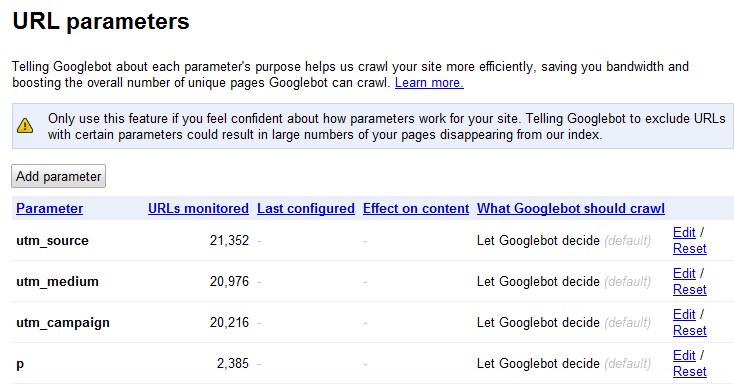
To access the feature, log into your Google webmaster tools account, click on the site you want to configure, and then choose Site configuration > URL parameters. You’ll see a list of parameters Google has found on the site, along with the number of URLs Google is “monitoring” that contain this parameter.

URL Parameters

The default behavior is “Let Googlebot decide”. This results in Google figuring out duplicates and clustering them. As they say in their help content:

“When Google detects duplicate content, such as variations caused by URL parameters, we group the duplicate URLs into one cluster and select what we think is the “best” URL to represent the cluster in search results. We then consolidate properties of the URLs in the cluster, such as link popularity, to the representative URL. Consolidating properties from duplicates into one representative URL often provides users with more accurate search results.

To improve this process, we recommend using the parameter handling tool to give Google information about how to handle URLs containing specific parameters. We’ll do our best to take this information into account; however, there may be cases when the provided suggestions may do more harm than good for a site.”

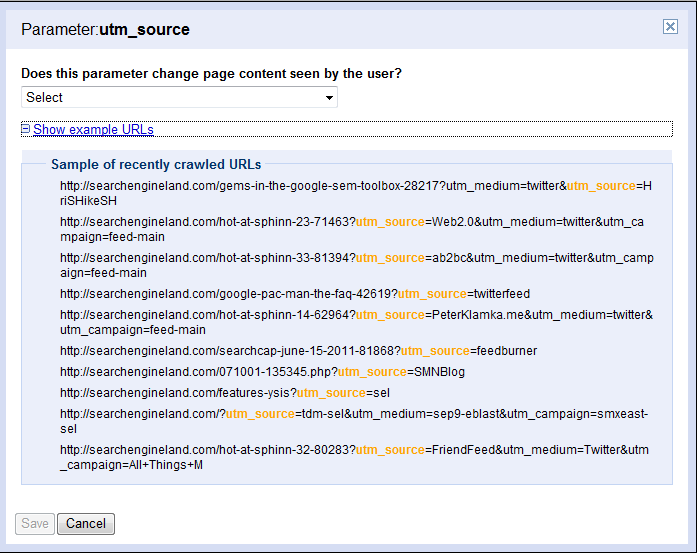
But if you want to have some control over that process, click Edit to specify whether that parameter changes the page content. You can look at a list of recently crawled URLs with that parameter to help you figure out what they’re used for.

Google webmaster tools parameters

Your choices are:

No: Doesn’t affect page contentYes: Changes, reorders, or narrows page content

If you choose no, you see the following message:

Select this option if this parameter can be set to any value without changing the page content. For example, select this option if the parameter is a session ID. If many URLs differ only in this parameter, Googlebot will crawl one representative URL.

Google will associate any URLs with those parameters with the versions without them. So for instance, if Google comes across the following two URLs, they’ll cluster both together as the first URL:

www.mygreatsite.com/buffy-is-still-awesome.phpwww.mygreatsite.com/buffy-is-still-great.php?referrer=buffyangelship4eva

If you choose Yes, you see even more options.

parameters

Sorts – the content stays the same, but is reorderedNarrows - the parameter is a filter that displays a subset of the contentSpecifies - the parameter determines the page contentTranslates - the page content appears in a different languagePaginates - that parameter indicates the page number of a larger set of contentOther - none of the aboveLet Googlebot decide -this is the default; Google will use other signals to determine which URLs to crawlEvery URL - Google should crawl all URLs and use the value information above to choose what to consolidateOnly URLs with value – triggers a list of values Googlebot has crawled to  choose from; use this option if you want Google to crawl only URLs that contain a specific value for a parameter (and not crawl any others)No URLs – you don’t want Google to crawl any URLs with this parameter (but not that using a pattern match in robots.txt may be better option in this case)

Handily, Google shows you how your choices will impact crawling:

parameters

Seem overwhelming? Fortunately, another new feature Google has launched is the ability to download all of the parameter settings as a CSV file so you can sort though them offline.

As Google notes on the page, “Only use this feature if you feel confident about how parameters work for your site. Telling Googlebot to exclude URLs with certain parameters could result in large numbers of your pages disappearing from our index.” The benefit, though, is multifold. The crawl is more efficient, so more pages of the site may get crawled and therefore indexed, and links are consolidated to a single version that may then gain rankings.

My guess is that Google may not immediately stop crawling the pages, as they may want to make sure the content is in fact the same before consolidating the URLs into a single version. But if you aren’t an expert with URL parameters and canonicalization, you probably want to let Google sort this out and not change these settings. They do, in fact, do a fairly good job, particularly when URLs use standard key-value pairs.

If you know the ins and outs of URL parameters and know exactly what you want Google to crawl, then go for it. Jonathon Colman of REI jumped on these new features right away!

jcolman

jcolman

Should you use this feature if you’re already using the rel=canonical attribute on the pages? Sure! Google’s help says:

“You can also give Google additional information by adding the rel="canonical" element to the HTML source of your preferred URL. Use which option works best for you; it’s fine to use both if you want to be very thorough.”

I still have questions about this feature, like how it impacts a crawlable link architecture with substantial pagination. If you’re interested in digging as well, note that I’ll be moderating a session on this at SMX East, and Maile Ohye of Google, who’s spent a lot of time on this issue, as well as experienced practioners, will be on hand to provide practical answers.

Related Topics: Features: Analysis | Google: Webmaster Central | SEO: Duplicate Content

About The Author: Vanessa Fox is a Contributing Editor at Search Engine Land. She shares her perspectives on how search impacts marketing, user experience, and web development at ninebyblue.com. Her book, Marketing in the Age of Google, provides a blueprint for incorporating search strategy into organizations of all levels. Follow her on Twitter at @vanessafox. See more articles by Vanessa Fox

SMX - Search Marketing Expo

View the original article here


This post was made using the Auto Blogging Software from WebMagnates.org This line will not appear when posts are made after activating the software to full version.

Monday, 18 July 2011

Today On Google+: A Handful Of Helpful Tools, Google+ Officially Over 10 Million Users & Friday Fun!

Below is today’s top news relating to Google+, as reported on Search Engine Land and from other places across the web.

Over 10M Google+ Users was shared late yesterday by Larry Page, Google’s CEO, in the midst of the quarterly Google earnings call.  This number is still far-removed from Facebook’s 750,000,000+ users, but a good sign that Google+ is gaining momentum.

Google+ WordPress Plugin is an easy way to add your Google+ profile to WordPress.  This plugin creates a “googleCard” that shows your profile picture, name and the number of circles that you are in.

Getting The Google+ Feed For Any Profile is a post submitted to Reddit that shows how to grab public posts from Google+.  This method shows how the profiles are created in JSON and with the proper tweaking your Google+ posts can be pulled into your website.

How To Make Google+ Circles Better is an informative chart that makes a case for “sub-circles,” or circles within circles.  While this may be too complex for novice users, the theory makes a case for the sub-circle model creating a cleaner stream without duplicate content.

The Google+Exodus is an app that was built to send Google+ invites out to your Facebook friends.  Facebook doesn’t let you export your friends, so this tool helps you invite ALL your friends over to Google+.

Google+ Facebook Dilemma is a cartoon from someecards that highlights the issue of blocked Facebook friends on Google+.

Google-, The Anti-Social Network is a satirical video about Google+ that highlights negative feature possibilities.  These features include subtracting friends, a thumbs down button AND a dislike button because “the majority of users updates are pretty depressing.”

21 Google Circles You Can Actually Use is a post by HappyPlace.com that shows what you might name your circles if you were naming truthfully.  My favorite fake circle?  ”Friends of My Dad That Hug Too Long.”

Related Topics: Google: Google+

About The Author: Greg Finn is the Chief Marketing Officer for Cypress North, a company that specializes in social media and search marketing services and web-based application development. He has been in the Internet marketing industry for 6+ years and specializes in Social Media Marketing. You can also find Greg on Twitter (@gregfinn) or LinkedIn. See more articles by Greg Finn

SMX - Search Marketing Expo

View the original article here


This post was made using the Auto Blogging Software from WebMagnates.org This line will not appear when posts are made after activating the software to full version.

Wednesday, 6 July 2011

SEO Tools - SEO PowerSuite Review


SEO PowerSuite is a package which can help you with each factor of SEO to enable you to improve the search results overall performance of one's web site. This particular SEO PowerSuite review provides you with an in depth information with the benefits and features provided by SEO PowerSuite.

Link Assistant will be building a particular marketing take care of extraordinary financial savings in SEO PowerSuite. Obtain the expert model for less than $249 as well as the business version pertaining to $599. That is $150 over specialized along with $400 over venture.

Employ this specific link with regard to exclusive access to these kind of small amount of time discounts...

SEO PowerSuite Discount Code

About SEO

Search engine optimisation is the scientific disciplines and art a part of ensuring that your site charges highly inside search engine results pages (Search engines) for that given question. It is absolutely vital, which is a brand new well-known fact that your clientele who transform greatest are the ones which come across your site on a normal internet search engine issue. This can be called "organic visitors.Inch In spite of your purpose inside wanting a great deal of website visitors for your site and even blog, you need to you should remember the best viewers tend to be organic search motor website visitors. The beauty of SEO is the fact once your site and even blog benefits ground, the benefit the idea purchased from the search engine optimisation surgery is pretty much long term. Employing advertising, you need to preserve paying for your website website visitors; with search engine marketing, you get more and more targeted traffic plus it gets increasingly less expensive because website's standing increases.

This is where SEO PowerSuite also comes in: SEO PowerSuite will offer a huge improve to get a search engine optimization functions.

SEO PowerSuite Features

SEO PowerSuite adopts any four-pronged technique of SEO and consequently consists of four unique programs: Rank Tracker, Website Auditor, SEO Spyglass and Link Assistant. They have got chose to make this bundle to pay almost all expert SEO requirements however they furthermore market the particular every software application independently.

-------Website Auditor

Website Auditor will be the 2nd system involving SEO PowerSuite. That works a detailed study of your respective website's information to find out how search-engine-friendly it can be. Amongst other things, Website Auditor will explain regarding key phrase occurrence as well as other SEO-related info that will assist you along with on-page optimisation.

In addition, Website Auditor will certainly conduct exactly the same evaluation to your top ten rivals, to enable you to deliver your current site's content material up to date together with your rivals regarding SEO. One of many strategies of SEO is to assess precisely why and how your rivals are performing properly after which accomplish exactly the same issue however better. SEO PowerSuite is an very helpful tool through this kind of SEO strategy.

If you would like to understand more about this effective auditing request, you can visit this specific Website Auditor Review while keeping focused an in depth dysfunction.

---------SEO Spyglass

The 3rd Factor towards the SEO PowerSuite

Another portion of SEO PowerSuite is actually SEO Spyglass. This particular computer software may perform potent evaluation associated with just how the competition are executing so effectively inside search engines. SEO Spyglass will quickly realize out how many back-links every single competitor gives, that websites web address to the present competitor in addition to, most importantly, exactly what anchor-text these back links employ. The actual anchor-text from the hyperlink is only the words and phrases that make up the link. Anchortext is vital exploring serp optimization, because Google and other search engines use anchor text to decide precisely what the target page is just about. This is why links her or his anchor text is "click here" won't be as helpful due to the fact those that have directly suitable anchor text. SEO Spyglass will give you all of this information about your competitors and more. In this way you'll comprehend specifically what to do to connect and also outrank your current web opponents.

Find out about the competition and focus this specific SEO Spyglass Review, ideally you're able to that very first.

-----------Rank System

Performance involving Rank Tracker...

Rank Tracker features a detailed investigation related to how your site is executing in the search engines much like yahoo. It works a totally automated evaluation that can save you a whole lot regarding moment. If you have ever accomplished your own personal search engine optimization, you should understand that the essential job should be to perform worries looking engines on the key phrases and see exactly how nicely your posts as well as other web pages do. When your website is just not undertaking too within the engines like google, this exercises are shateringly tedious, once you should find your site listed far from best, and manually researching all those position seeking results pages is to be sincere a waste of time when you're able to avoid it. SEO PowerSuite's Rank Tracker might all of this for you. In this way you know how you are doing and likewise, more importantly, once SEO PowerSuite really starts to produce that it is SEO most recent results for your web site, Rank Tracker will reveal precisely how your search serp standing is actually bettering.

The opposite valuable function involving Rank Tracker is always that it is going to warn anyone associated with any worthwhile keyword phrases that you may have have missed. In this way you can develop search-engine-optimized information specifically for these key terms and then employ SEO PowerSuite's functions to ensure that those same pages achieve the search engines.

To learn more, pay a visit to this Rank Tracker Review as well as find out more about what exactly it is offering.

--------Link Assistant

The past Element in the actual SEO Pack

The fourth application inside of SEO PowerSuite is Link Assistant. Link Assistant will assist one to along with your link-building campaign. SEO Spyglass will certainly advise you what you should do regarding link-building; Link Assistant help you you to carry out that will tactic. A major portion of making reciprocal back links has a stylish website link service on your own site. That's where you can place back links that you should websites which will web address back to you. Certainly these kind of pages should appear popular with the possible spouse, or else they shall be not wanting to trade back-links with you. Link Assistant may wonderfully integrate the appearance and also feel of their back-links page with your web site so that it looks custom-made.

Far more generally, Link Assistant will help you as well as keeping track of all the internet owners you e-mailed, and in addition will keep close a record of your hyperlink pets to make sure that they're not playing unethical conduct as an illustration sneaking the "rel="nofollow"" draw on their own backlinks internet, which usually in essence explains to find applications not to help make backlinks seriously. Venture effectively in the search engines like yahoo will take many back links, along with Link Assistant will help you Initial acquire and then keep close track of individuals back links.

Get yourself a building links campaigns in focus on and check out this specific Link Assistant Review for more information.

SEO PowerSuite Review: Conclusion

SEO PowerSuite has a variety of programs that may drastically boost your SEO attempts: Rank Tracker, Website Auditor, SEO Spyglass along with Link Assistant. These a number of purposes form a very total and incredibly effective combination that can help you want, create and apply a whole new devastatingly efficient SEO strategy to enable you to compensate for and hereafter outshine the competitors inside the engines like Google. The manufacturers involving SEO PowerSuite are usually totally self-assured of their item: in just 30 days of getting SEO PowerSuite, if you're dissatisfied using its potential to improve your current SEO method, you will be granted the full repayment without any hassle.

Ideally a person found this unique SEO PowerSuite review beneficial. If you are an SEO PowerSuite customer, make sure you consider submitting your individual review in the Guestbook down the page. Many thanks so much, and have fun with your on the web undertakings!


www.wordpressplugincouponcode.com birng you the best Premium wp discount code & seo software discount code, such as the Gorilla Themes Coupon Code & Seo Powersuite Discount, auto blog plugins WPRobot to creating a Wordpress autoblogs site!


This post was made using the Auto Blogging Software from WebMagnates.org This line will not appear when posts are made after activating the software to full version.