Showing posts with label Webmaster. Show all posts

Tuesday, 26 July 2011

SEO Software Applications - Is it the Key to Survival in the Webmaster World?


SEO Software comes in many shapes and forms. Market Samurai. WebSEO. Let's not forget the online SEO software applications too such as SBI, CSN and Tube Mogul just as a few examples. You see, the thing here is that a lot of people claim these applications to be their edge, myself included. Personally for keyword research, I use Market Samurai like it is going out of fashion. There are a good handful of other webmasters who do look at the use of both offline and online SEO software applications as being unethical and not needed, so we are going to pull this debate apart here for you.

First and foremost, there are applications out there that do break the rules of many businesses and organizations out there, at the same time, they are accepted by a lot of other well-known businesses and organizations. If you are looking for me to talk about these, you are in the wrong place.

Why do people use these applications? Myself included, I use these applications because I have a lot on my plate. As a collective, I control some 35 domain names, with 5 of these being very active websites that demand my attention on a daily basis, so of course when there is an SEO software application that allows me to do more of what I need in less of the time that I usually do it in, of course that is going to be something that I will look further into. However, I do stress that with any application that you use, you look into the implications of using that piece of software. Time certainly does equal money, however, money can quickly vanish if you are seen to be breaking the rules!

I came across an interesting predicament the other day, which I will use as an example here. An experienced and successful webmaster asked me the other day about certain methods that I use, now I will stress here that what I do at the moment I treat very professionally as if it is a full time job, but I don't earn enough from it to be a real full time job. This is an investment in my future away from the office. His comment when I told of certain software for keywords that I use, and for link building, was that he does not approve of this. Now, I stress that these methods are very acceptable in the wider community, they are certainly not black hat methods or even grey hat for that matter. Keep in mind that the person that I was talking to was very fond of outsourcing as well, so it is a real 50/50. If you can afford to outsource, and the companies and organizations that you work with approve of this, then that is always going to be a better option for you. If not, just make sure it is ok for you to use certain SEO software applications as to avoid any embarrassment or loss.

So, this brings me to the debate between use of such SEO software applications and Outsourcing. Personally, I don't see a huge difference apart from the fact that outsourcing is generally much more professional than the automated results that you will achieve from a machine. However, I will again stress that there are services that can be outsourced that are also frowned upon, and approval should be sought beforehand. As I mentioned in the opening paragraph, I will not promote these methods, however, I do encourage their use if it is allowed.

This all seems like a lot of ramble, I know. It's a very complicated situation. Let's summarize this article before I confuse too many people. The use of SEO software applications is frowned upon by some. There are no set rules for the webmaster apart from those that are set by individual companies and organizations, so this is where it comes down to preparation. The newcomer to the webmaster world will be much more inclined to do whatever it takes, regardless of whether or not it breaks the rules or not, and will not accept their fate when they are either banned from certain services, or realize that their search engine rankings start to suffer. The key here is research. If an article directory does not allow you to use an SEO software application that allows you to spin articles, the simple thing here is, don't use it! If Google doesn't like people to automatically build huge quantities of links in a very short time frame, then don't do it! The key to effective SEO is time. There is no such thing as a 7 day method that works. The more time you take to generate backlinks, to write articles, to generate good content, this will always work in your favour. As such, you should treat your decisions on what SEO software applications to use, if any at all. They can either be your very own edge, or your green light to imminent failure.


Ryan is the owner of Affordable SEO Services, and writes on a daily basis about his own experiences using different SEO Methods, and his experiences using SEO Software and their effectiveness. Ryan likes to promote ethical SEO, and organic SEO as an extremely beneficial way for webmasters to not only achieve great search engine results, but as a way to literally dominate your keywords in the search engines.

If you would like more information about SEO Software and the different used of these applications, this can be found by browsing to the SEO Software category at Affordable SEO Services.


This post was made using the Auto Blogging Software from WebMagnates.org This line will not appear when posts are made after activating the software to full version.

Friday, 22 July 2011

Google Adds URL Parameter Options to Google Webmaster Tools

In 2009, Google launched the parameter handling feature of Google webmaster tools, which enabled site owners to specify the parameters on their site that were optional vs. required.  A year later, they improved this feature by providing an option for a default value. Google says that they’ve seen a positive impact from the usage of those tools thus far.” Now, they’ve improved the feature again, by enabling site owners to specify how a parameter changes the content of the page.

My original article on parameter handling describes the issues that parameters can cause with how search engines crawl and index a site. In particular, as the parameters multiply, the number of near duplicate pages grows exponentially and links may be coming in to all of the various versions. This dilutes PageRank potential, and the “canonical” version of a page may not ending ranking as well as it otherwise would. Search engines may also spend much of their crawl time of various versions of a small subset of pages, preventing them from fully crawling (and thus indexing) the site.

So what’s new? You can now specify whether or not a parameter changes the content on the page. For those that don’t, once you specify that, you’re done! Things get more complicated if a parameter changes the content on the page. You now have a number of options available, described in more detail below. This latest incarnation of the feature impacts both which URLs are crawled and how the parameters are handled.

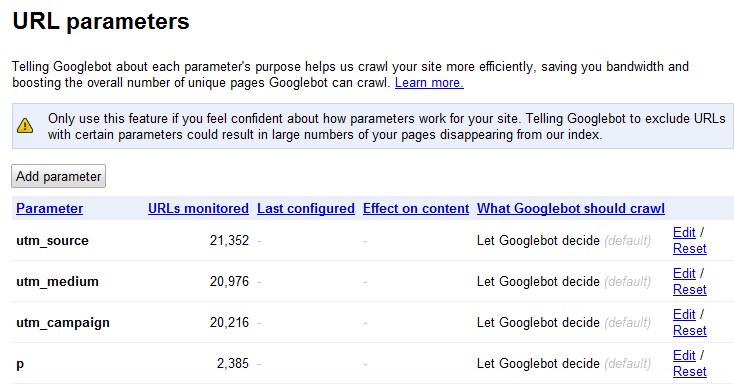
To access the feature, log into your Google webmaster tools account, click on the site you want to configure, and then choose Site configuration > URL parameters. You’ll see a list of parameters Google has found on the site, along with the number of URLs Google is “monitoring” that contain this parameter.

URL Parameters

The default behavior is “Let Googlebot decide”. This results in Google figuring out duplicates and clustering them. As they say in their help content:

“When Google detects duplicate content, such as variations caused by URL parameters, we group the duplicate URLs into one cluster and select what we think is the “best” URL to represent the cluster in search results. We then consolidate properties of the URLs in the cluster, such as link popularity, to the representative URL. Consolidating properties from duplicates into one representative URL often provides users with more accurate search results.

To improve this process, we recommend using the parameter handling tool to give Google information about how to handle URLs containing specific parameters. We’ll do our best to take this information into account; however, there may be cases when the provided suggestions may do more harm than good for a site.”

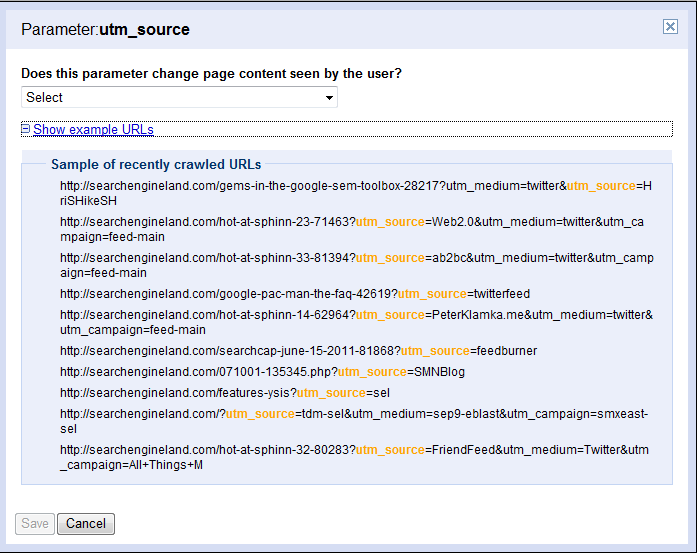
But if you want to have some control over that process, click Edit to specify whether that parameter changes the page content. You can look at a list of recently crawled URLs with that parameter to help you figure out what they’re used for.

Google webmaster tools parameters

Your choices are:

No: Doesn’t affect page contentYes: Changes, reorders, or narrows page content

If you choose no, you see the following message:

Select this option if this parameter can be set to any value without changing the page content. For example, select this option if the parameter is a session ID. If many URLs differ only in this parameter, Googlebot will crawl one representative URL.

Google will associate any URLs with those parameters with the versions without them. So for instance, if Google comes across the following two URLs, they’ll cluster both together as the first URL:

www.mygreatsite.com/buffy-is-still-awesome.phpwww.mygreatsite.com/buffy-is-still-great.php?referrer=buffyangelship4eva

If you choose Yes, you see even more options.

parameters

Sorts – the content stays the same, but is reorderedNarrows - the parameter is a filter that displays a subset of the contentSpecifies - the parameter determines the page contentTranslates - the page content appears in a different languagePaginates - that parameter indicates the page number of a larger set of contentOther - none of the aboveLet Googlebot decide -this is the default; Google will use other signals to determine which URLs to crawlEvery URL - Google should crawl all URLs and use the value information above to choose what to consolidateOnly URLs with value – triggers a list of values Googlebot has crawled to  choose from; use this option if you want Google to crawl only URLs that contain a specific value for a parameter (and not crawl any others)No URLs – you don’t want Google to crawl any URLs with this parameter (but not that using a pattern match in robots.txt may be better option in this case)

Handily, Google shows you how your choices will impact crawling:

parameters

Seem overwhelming? Fortunately, another new feature Google has launched is the ability to download all of the parameter settings as a CSV file so you can sort though them offline.

As Google notes on the page, “Only use this feature if you feel confident about how parameters work for your site. Telling Googlebot to exclude URLs with certain parameters could result in large numbers of your pages disappearing from our index.” The benefit, though, is multifold. The crawl is more efficient, so more pages of the site may get crawled and therefore indexed, and links are consolidated to a single version that may then gain rankings.

My guess is that Google may not immediately stop crawling the pages, as they may want to make sure the content is in fact the same before consolidating the URLs into a single version. But if you aren’t an expert with URL parameters and canonicalization, you probably want to let Google sort this out and not change these settings. They do, in fact, do a fairly good job, particularly when URLs use standard key-value pairs.

If you know the ins and outs of URL parameters and know exactly what you want Google to crawl, then go for it. Jonathon Colman of REI jumped on these new features right away!

jcolman

jcolman

Should you use this feature if you’re already using the rel=canonical attribute on the pages? Sure! Google’s help says:

“You can also give Google additional information by adding the rel="canonical" element to the HTML source of your preferred URL. Use which option works best for you; it’s fine to use both if you want to be very thorough.”

I still have questions about this feature, like how it impacts a crawlable link architecture with substantial pagination. If you’re interested in digging as well, note that I’ll be moderating a session on this at SMX East, and Maile Ohye of Google, who’s spent a lot of time on this issue, as well as experienced practioners, will be on hand to provide practical answers.

Related Topics: Features: Analysis | Google: Webmaster Central | SEO: Duplicate Content

About The Author: Vanessa Fox is a Contributing Editor at Search Engine Land. She shares her perspectives on how search impacts marketing, user experience, and web development at ninebyblue.com. Her book, Marketing in the Age of Google, provides a blueprint for incorporating search strategy into organizations of all levels. Follow her on Twitter at @vanessafox. See more articles by Vanessa Fox

SMX - Search Marketing Expo

View the original article here


This post was made using the Auto Blogging Software from WebMagnates.org This line will not appear when posts are made after activating the software to full version.
Wednesday, 6 July 2011

Google’s Sending Webmaster Notifications About Bad Links Pointing At Their Sites

http://twitter.com/sengineland

Subscribe to Our Feed! 75,998 subscribers take our RSS feed

Follow Search Engine Land at Google+  Search Engine Land on Google+

Get updates as the news happens with our free newsletter, feed & social options


View the original article here


This post was made using the Auto Blogging Software from WebMagnates.org This line will not appear when posts are made after activating the software to full version.